Work 2026
AIWalls
An independent AI image lab: eighteen local experiments on open-weight models that fit a 16 GB GPU, each published with its prompt, sampler, seed, 4K crop and bench notes.
- Year
- 2026
- Role
- Solo: product, generation pipeline, engineering
- Client
- Personal project
- Links
- aiwalls.zainharoon.com ↗
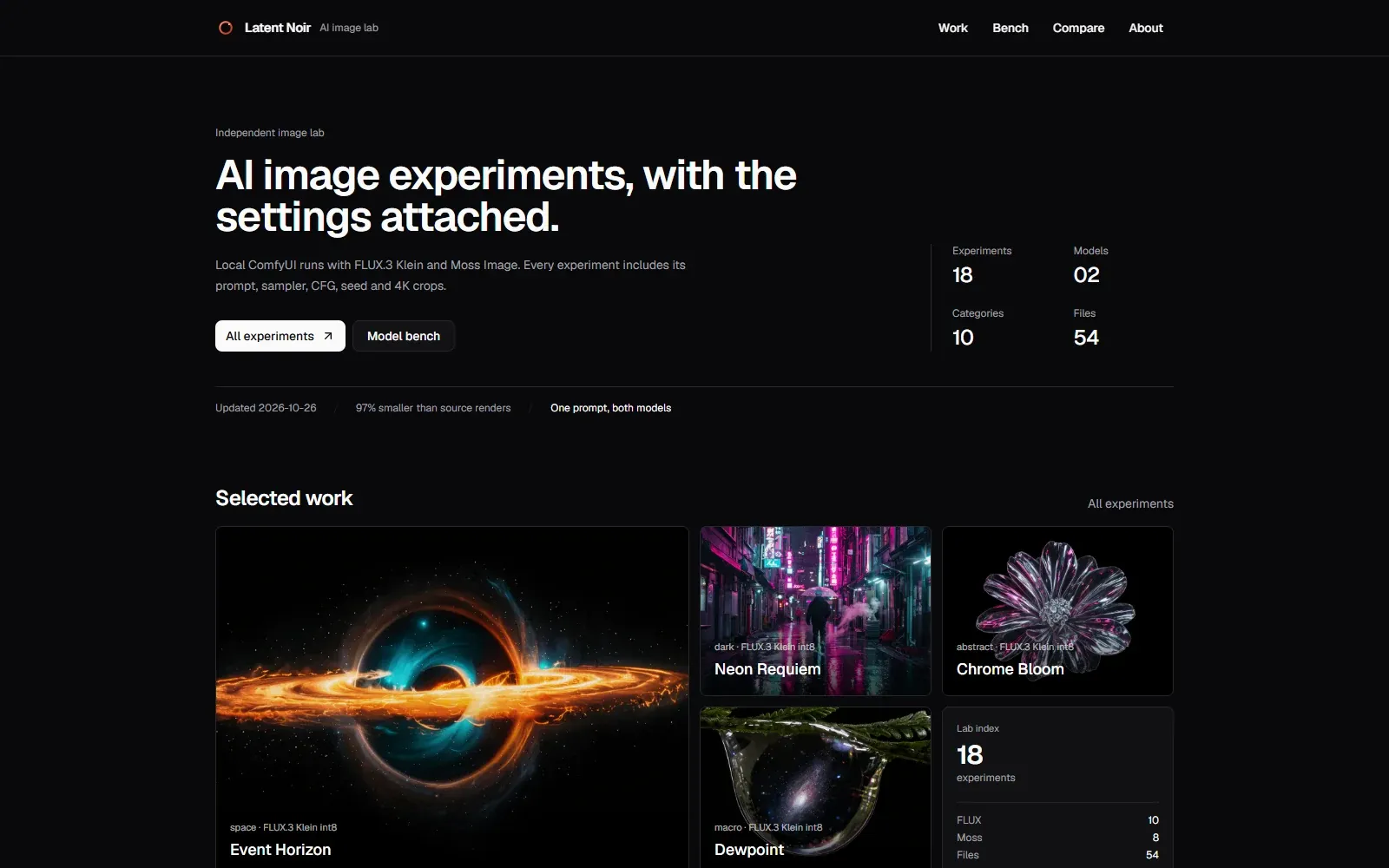
The Latent Noir home page: a black editorial layout with the headline 'AI image experiments, with the settings attached.' above a large Event Horizon black-hole render, with 18 experiments and 54 files in the stats strip.
Stack
- Next.js 16
- TypeScript
- ComfyUI
- Open-weight models
- shadcn/ui
- Cloudflare R2
- sharp
AIWalls is a local image lab. Eighteen experiments across ten categories, each published with its prompt, negative prompt, model, sampler, scheduler, CFG, steps, seed and a 4K master crop. It also keeps a model bench, a same-prompt comparison and a run log.
The current bench is FLUX.3 Klein and Moss Image. The pipeline is not tied to either: any open-weight checkpoint that fits a 16 GB card and exposes a ComfyUI graph can run through the same prompt system, metadata extractor, crop pipeline and publish step.
The images render on a 16 GB RTX 4060 Ti. One 16:9 master at two to three megapixels is cropped into desktop, phone and ultrawide versions, encoded to AVIF and WebP, uploaded to Cloudflare R2, and recorded in a JSON manifest. The site is a static Next.js app that reads the manifest at build time.
Problem
Most AI image sites show a picture and, if you are lucky, a prompt in a screenshot. That is enough to admire an image and not enough to make it. I wanted the recipe on the page: model, sampler, seed, prompt and negative prompt, source resolution, crop strategy, and the size of every download.
Metadata was the first constraint. ComfyUI stores the prompt graph in the PNG's text chunks, but the graph is a tangle of node IDs whose titles change between workflows. Turning it into a stable recipe across KSampler, KSamplerAdvanced, SamplerCustomAdvanced, FluxGuidance and LoRA chains is the work, and it has to survive renamed or rewired workflows.
Weight was the other. A 4K PNG from ComfyUI can be 16 to 24 MB, and a deliberately noisy one can be 25 MB. A gallery shipping three of those is not browsable on a phone.
Comparison was the harder one. A gallery needs one good image per slot. A lab has to publish the settings that make two models comparable, then admit where the comparison is not equal. FLUX.3 Klein runs at CFG 1 and 16 steps. Moss Image needs CFG 4.5, 50 steps and a different sampler. Same prompt, same canvas, different settings, and the page says so.
Building it
I skipped a database. Eighteen works and fifty-four ratio outputs fit in a JSON file that builds fast, diffs cleanly, is backed up by git, and needs no connection string. The index, run log, bench, RSS feed and JSON API all read it. A database arrives when likes, views or an edit queue do.
I render one master and crop the other ratios. Generating each ratio separately is the obvious pipeline and the wrong one: even with the same prompt and seed, the model invents a different composition.
The metadata comes from the graph. A post-processing script guessing from EXIF is always incomplete, so a ComfyUI node, Walls Save, sits at the end of the graph instead of SaveImage and describes what ran.
Performance
The 16 GB card sets the ceiling. I render at two to three megapixels, batch 1, with int8 checkpoints. Runs are sequential, one image at a time, and I switch checkpoints between models. A direct 8.3-megapixel 4K render runs out of memory. The 4K and 5K downloads are Lanczos upscales from the 2–3 MP master, and the UI marks them as upscaled.
The settings are on every experiment page. FLUX.3 Klein runs at 16 steps, CFG 1, euler/simple. A 2 MP render takes about 20 seconds. Moss Image runs at 50 steps, CFG 4.5, dpmpp_2m/karras. A 2 MP render takes about two minutes. That six-times gap is why the bench names the model per run.
The delivery path is three parts: ComfyUI renders, a custom node writes the graph and a JSON sidecar, and a static Next.js site reads a manifest. The command names and crop scripts are implementation detail. The render time, resolution ceiling, step count and delivery size are what decide the result.
The compression is detail-first. Display variants are downscaled to the size the page renders, and the 4K downloads keep a high-quality AVIF and a WebP fallback. Event Horizon is 37.5 MB of source PNG in and 0.9 MB of web delivery out, a 97.6% cut, with the full-size master still available.
Challenges
The graph normalizer kept growing. Workflows do not agree on node names, and one with a hires-fix pass or a refiner has more than one sampler. The importer scores each sampler node, picks the likely final one, then walks upstream for the model, latent size, guidance and LoRAs. When that is ambiguous, I pass the values explicitly.
The comparison was the easiest place to lie to myself. Same prompt and same canvas make it tempting to present a pure model difference. It is not, because each model needs different sampler settings. The compare page prints both sets, the bench repeats them per model, and the run log keeps the original seed.
Keeping the manifest static means publishing is a commit and a rebuild. That is fine now and a limit later. The moment I add likes, downloads or an editing queue, the JSON file stops being the right store.
Results
The current set holds eighteen works across ten categories, two models and fifty-four ratio outputs. The source PNGs total 737.3 MB; the delivered web set totals 20.4 MB, about 97% smaller.
A few pieces: Event Horizon, Chrome Bloom, Neon Requiem and Tidal Glass. The full set is in the experiments index, with the model bench and the same-prompt comparison alongside it.
Lessons learned
The recipe is the part worth keeping. An image is a nice output; an image you can reproduce is a body of work. Once the metadata became the primary artifact, the sidecar, manifest, experiment page and bench organised themselves around it.
The 16 GB card shaped this project more than the choice of diffusion model. A pipeline that respects the hardware is worth more than a marginal quality bump that crashes halfway through a run, and a new open-weight model can replace the current one without rewriting the lab.
A comparison is a data problem. The same prompt is not the same settings, and the honest way to show two models side by side is to publish both sets of knobs.