Work 2026
RGB Studio
A per-LED lighting app for PC fans, RAM and strips, built to skip the extra hub and the subscription. A tiny Rust service keeps the lights running; a desktop app shapes them.
- Year
- 2026
- Role
- Solo: design, Rust service, React UI, packaging
- Client
- Personal project
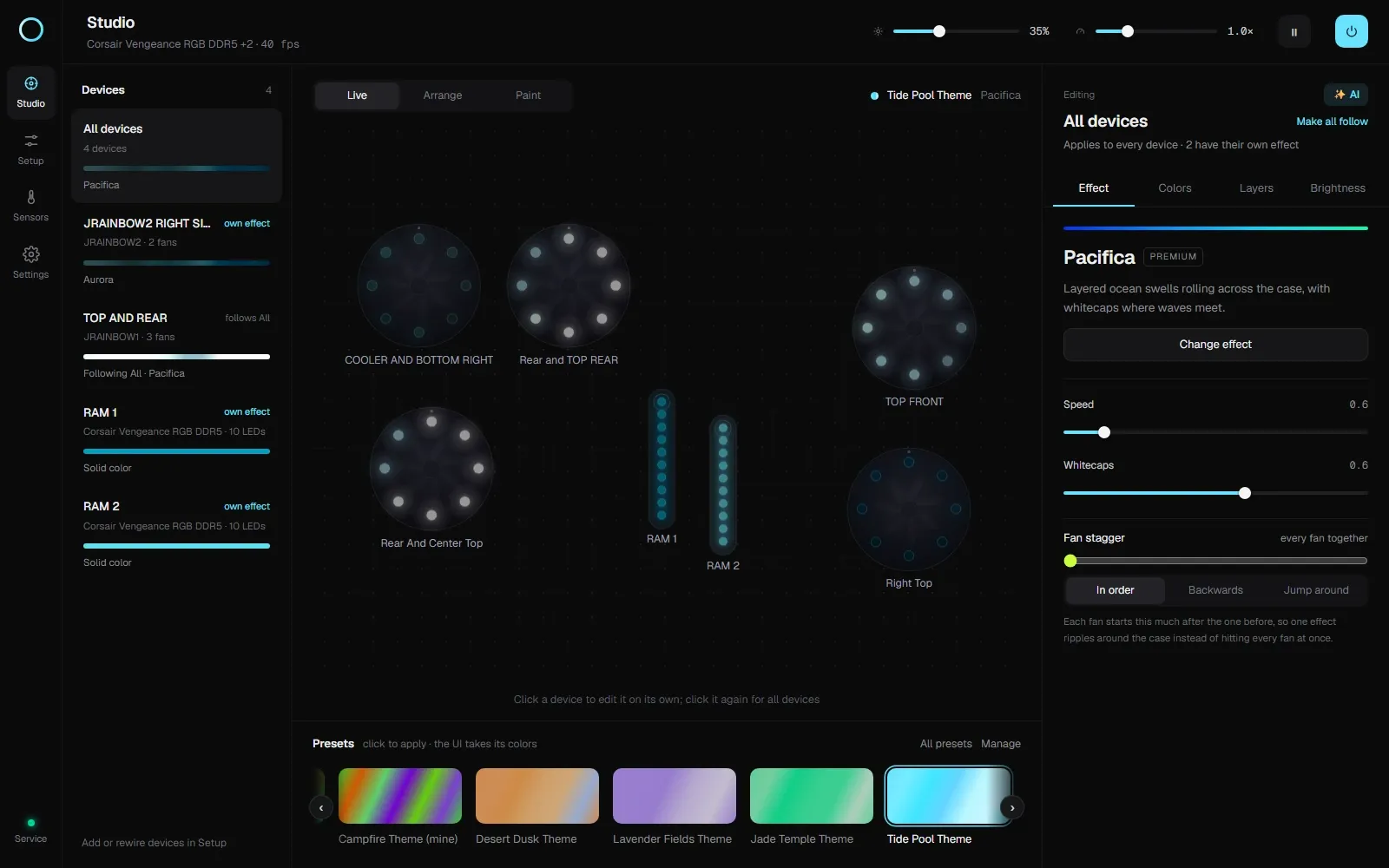
The RGB Studio Studio screen — a live case preview with four fan rings and two RAM sticks lit in the Pacifica preset, the device list on the left and effect controls on the right.
Stack
- Rust
- Tauri
- React
- TypeScript
- OpenRGB
- WASAPI
- DXGI
- WebSocket
RGB Studio controls every LED in a PC through OpenRGB: fan rings, RAM, strips, motherboard headers. It has two parts. rgbd is a small Rust service that owns the lighting and starts at login. RGB Studio is a Tauri and React desktop app that changes it. Close the app and the lighting keeps running.
Why I built it
My board already has ARGB headers. I did not want to buy another controller hub to get a fan group onto one channel, and I did not want a subscription app to unlock the effects I actually wanted.
Mystic Light gave me a fixed list of effects and a speed slider that stopped short of what I wanted. SignalRGB wanted a subscription for the useful parts. A hub added cost, another box and another vendor app. None of them let me decide what the header does.
I wanted the hardware I already paid for to be programmable: my own effects, palettes and speeds, per device, without a vendor choosing which knobs exist. That was the whole project.
What it does
The app ships more than forty effects, 31 themes and 84 palettes. Effects have speed and intensity controls, devices can run their own effect, layers can paint a second effect on a few LEDs, and brightness works per device type, per device and per header. Presets save the whole scene, with a starred preset for startup.
The reactive modes came later. Music uses WASAPI loopback, so it can listen to the whole desktop or one app, with no microphone and no driver. Screen reactive uses DXGI desktop duplication, downscaled on the GPU, and runs only while a screen effect is on the lights. Capture stops a few seconds after the effect is switched off, so it does not sit in the background.
The service can be started, stopped or killed from the app. rgbctl exposes the lighting controls from a terminal. Forza Horizon support came last: the game's Data Out feeds throttle, braking and revs, so the fans work as rev lights, blink at the shift point and flash on gear changes. It is the feature people ask about after they see the case.
The first version
I started with Python and React. FastAPI served the API and the built UI. React drew the case. One process did everything: state, effects, the render loop, the OpenRGB connection. It was a good way to learn the problem and a bad thing to leave running.
The app had to be open for the lights to do anything. To keep an effect alive, you kept a browser tab alive. Underneath sat a Python runtime, a web server and a browser for a job that should have been invisible. The resource cost was not one number. It was the whole stack, plus the assumption that the person using the lights would keep the app open. They would not.
A lighting tool is a background concern. Asking someone to keep a full-time app alive for a background job is the wrong shape.
The rewrite
I stopped trying to make the app lighter and asked why the app was in the render path at all.
A light is a peripheral. It should receive a frame and show it. The thing that holds intent, which effect is running, which layout is mapped, what happens after sleep, which preset is starred, belongs in a process that can outlive every window.
That is the division I built. rgbd is the system. The app is a remote control. The app can close; the lights keep going. The Tauri app, rgbctl, a script and a tray menu all drive the same service.
Python got me to the shape. It did not make sense for the part that runs at login. An always-on daemon has a different budget from a desktop app. It starts with Windows, survives a closed window, uses a few megabytes, and should not compete with a game. Shipping a Python runtime and a web stack for that is a lot of surface area to keep alive.
Rust gave me one executable, no interpreter to install, predictable memory, and a process I could leave running. Speed was not the reason. The service is always on, so its resource use matters before its benchmark score does.
Tauri kept the React UI and removed the bundled browser. The app is a native window, a tray icon and an updater. The UI stayed cheap to build. The daemon stopped paying for it.
Architecture
Clients talk to the service over HTTP and one WebSocket on 127.0.0.1:7420. The service talks to OpenRGB over its SDK protocol on 127.0.0.1:6742. There is no other hop.
- The desktop app and
rgbctlsend commands torgbd. rgbdholds the layout, scene, presets and settings.rgbdruns the render loop and writes frames to OpenRGB.- OpenRGB writes those frames to the motherboard, RAM, fans and strips.
The layout maps devices to zones, zones to items (a fan ring, a bar, a dot), and items to LEDs in a virtual chain. The chain order makes a travelling effect flow around the case in the order the fans are wired. The scene is a slot per device plus optional layers. The compositor draws the base effect, then layers, then brightness and gamma, and writes one colour per LED.
Every effect implements the same Effect interface and declares its parameters. The UI builds the controls from those declarations, and the tests render every effect, so a bad buffer fails the build rather than the lights. Presets are named snapshots. Recipes are custom effects stored as data and validated before they are accepted.
The service is deliberately boring where it matters. State is written to JSON atomically. The render loop skips unchanged frames. Preview frames are produced only while an app window is visible, and a minimised app tells the service it is hidden.
Power handling is the part users notice only when it is wrong. Screen off can dim the lights, load a preset, or idle the render loop. Sleep and shutdown write the final state before Windows continues. Wake reconnects to OpenRGB. The service never holds up a shutdown.
What broke
Hardware variance was the recurring theme. Two fans on one header can be wired in series or parallel. A fan can expose eight LEDs or sixteen. A strip can be one zone or several. The Setup screen has to let a person describe what is physically in the case. The LED finder lights the first LED red and the last green. The preview is draggable so the chain order can match the case.
Owning the OpenRGB client instead of wrapping a library made the awkward parts explicit. Each device is written whole because some controllers ignore zone-only updates. The first frame after switching to Direct mode is sent twice. Slow buses such as RAM are rate-limited. The link resyncs when OpenRGB rescans devices.
The local API is a security boundary. A website you visit should not be able to turn your lights off, so the service checks the Host and Origin headers and accepts only local apps. A DNS-rebinding attack gets a local hostname that does not match. The port is bound locally by default.
Result
RGB Studio is at v0.6, with a public Windows installer, a Linux build, and the user documentation published alongside the releases. The screenshots on this page are the real app running the lighting on the machine it was built on: four devices, two Corsair Vengeance RAM sticks and an MSI X670E board, with two fan headers under per-device control.
The service typically sits at a few megabytes of memory and well under one percent of a CPU core. The desktop app is a Tauri window rather than a bundled browser. Closing it does not stop the lights, which was the point.
Downloads and release notes live in rgb-studio-releases; the latest installer is here. If you have an ARGB case and a motherboard header, try it before buying another hub. If you use it, a star on the releases repo is the only usage signal I get, and it tells me whether to keep improving it.
Lessons learned
The split is the feature. Once the render loop lived in a service, the app became replaceable. A CLI, a tray menu and a script could all drive the same lights. Designing around “the lights keep running” produced a better architecture than designing around “the app has a preview”.
Run the thing that must stay alive as a service. Python was the right tool to find the shape and the wrong tool to leave running at login. Rust was not a rewrite for its own sake. It was what the always-on part needed.
Keep the old version until the replacement is real. I ran the Python app while the service was being built, then removed it when the service could stand alone. That made the migration a series of working states instead of a flag day.
Treat hardware as unreliable. Reconnect on rescan, resize zones on connect, write whole devices, rate-limit the slow bus, and never assume the frame that was sent is the frame that arrived.
A localhost API is still an API. Binding to loopback is not authorisation; a browser on the same machine can reach it. The Host and Origin checks are small, and without them any page could control the lights.