Writing 2 min read
Introducing: Cards & accounts
Set Money Diary up so its numbers match your bank: one account per wallet, real starting balances, and why paying a friend is an expense.

Zain Haroon — Full-stack Engineer
Most finance apps start you at zero and treat every rupee that appears afterwards as income. Install one on a Tuesday when you already have 40,000 in the bank and every balance it shows you is 40,000 short, forever.
So the first screen to set up in Money Diary is Cards & accounts. It takes about two minutes and everything else in the app depends on it.
Add one account per place your money lives
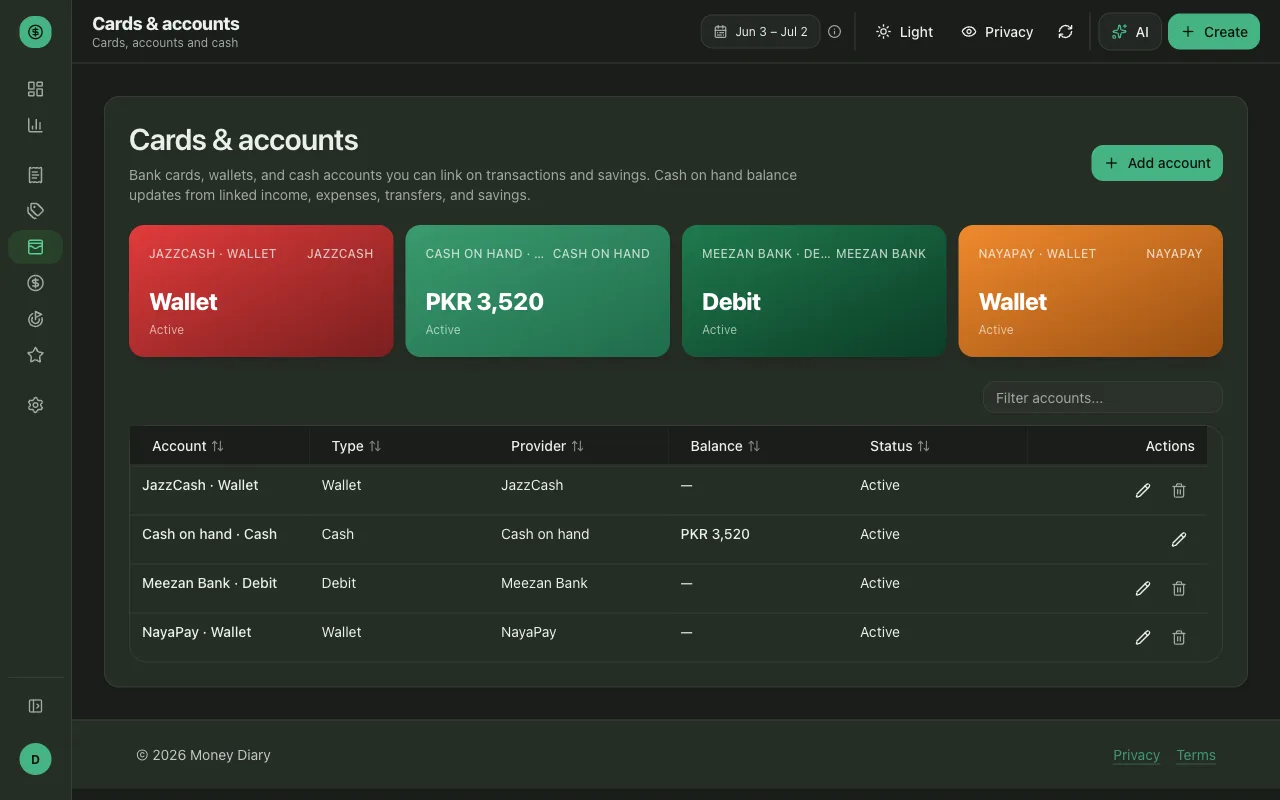
Open Cards & accounts from the sidebar and hit Add account. Create one entry for each wallet, bank account and cash pile you actually use. Mine are four: JazzCash and NayaPay as wallets, Meezan Bank as a debit account, and cash on hand.
Each account carries a type, a provider and a balance, and the table sorts by any of them. The coloured cards at the top are the same accounts, so you can read your spread at a glance without opening the table.
Give each one the balance you really have today
When you create an account, enter its current balance, not zero. Check your banking app, count the cash in your wallet, and type that number in.
After that, balances look after themselves. Log an expense against Meezan Bank and the Meezan card drops. Move money from the bank to your wallet and one falls while the other rises by the same amount. Cash on hand updates from every linked income, expense, transfer and savings entry you log against it.
A transfer moves money; an expense loses it
The app separates the two, and it stays strict about it because your spending charts depend on the difference.
A transfer is money moving between two accounts you own. Bank to wallet, wallet to cash. Nothing entered or left your life, so transfers never appear in spending totals.
Paying a person is an expense, even though it feels like a transfer while you’re doing it. Sending a friend 2,000, paying the Netflix charge, settling a loan you took: the money is gone from your world, so it counts as spend. Once you have that straight, “how much did I spend last month” stops being a guess.
Every expense also takes a category out of need, want, subscription, charity and other, which is what makes the analytics breakdown worth reading later.
Keeping accounts tidy
Each row has edit and delete actions, and a status field. Closed a card or stopped using a wallet? Mark it inactive rather than deleting it, so the transactions you logged against it keep their history.
One account you can’t delete is cash on hand, since it’s the fallback for anything logged without a specific account attached.
Next
Once your accounts are real, go log something. The fastest way in is the assistant: type what happened as a sentence and it files the entry against the right account. That’s the next post in this series.